
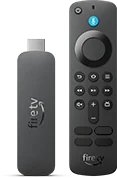
The 4K Select is a distinct device
Amazon identifies the 2025 Fire TV Stick 4K Select as build AFTCA002 and lists Vega OS in the specifications. Check for the exact retail name on the box, receipt or device information screen. Advice written for a Fire OS model, including instructions involving an Android APK, does not establish a Vega app installation route.
Check the app before committing to a plan
Search from the 4K Select home screen for the exact publisher and app. If you already have a working app on a different Fire TV, write down its name and developer for comparison. A store link that works on a phone or on a Fire OS stick can point to a different platform build. If the listing is missing, ask the provider which current Vega OS app it supports and whether your account includes that app’s login method. Choose a device the publisher supports if you need the service immediately.
Separate launch failures from feed problems
Open the app from the home screen and let it reach its first menu before signing in. If it returns directly to Home, note the app version, software build and any visible error. If you reach the app and only one live channel fails, compare that channel with a second channel in the same package. A report that includes the retail model, app publisher and exact failure point helps the publisher distinguish an app launch issue from a source issue.